Computer Hardware
Computer Hardware in Hindi – What is Hardware, Usage, Difference from Software [PDF]
In this article "Hardware in Hindi", learn what is computer hardware? How does it work? And how it communicates with the software.
Do you want to know what is Computer Hardware in Hindi? Hardware is the part of any computer system that you can see and touch — such as a monitor, keyboard, mouse, and motherboard. In this article we will understand in simple language how hardware works, what it is used for, and how it differs from software. Plus, you'll get a [PDF] guide that you can download for free!
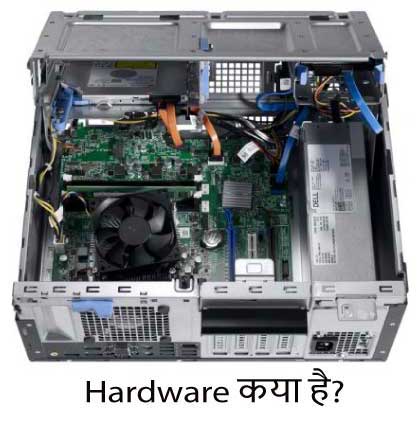
In this tutorial, learn what is hardware in Hindi? How does it work? And how it communicates with the software.
You will get to know everything about the component parts of the hardware. You only need to read this article for a few minutes.
Introduction to Computer Hardware (Hardware in Hindi Definition)
Computer hardware is the physical components that are required for a computer to function. Hardware refers to both internal and external devices that enable key functions such as input, output, storage, processing, and communication.
Hardware refers to the physical components of a computer or electronic system, including devices such as processors, memory, and peripherals.
Computer hardware is abbreviated as "HW", it refers to all the physical components of a computer, including the devices associated with it.
You can't build a computer or use software without using hardware. The screen on which you are reading this information is also a piece of hardware.
A computer is a programmable machine, which is both electronic and digital, and without software, a computer is useless. In other words, everything you do with a computer is done by hardware, operating system, and software.
What is Operating System and Software? Full information about this has already been given. If you haven't read it. So read it first so that you can understand this post completely.
Let us now understand Hardware in Hindi more well –
What is Hardware in Hindi?
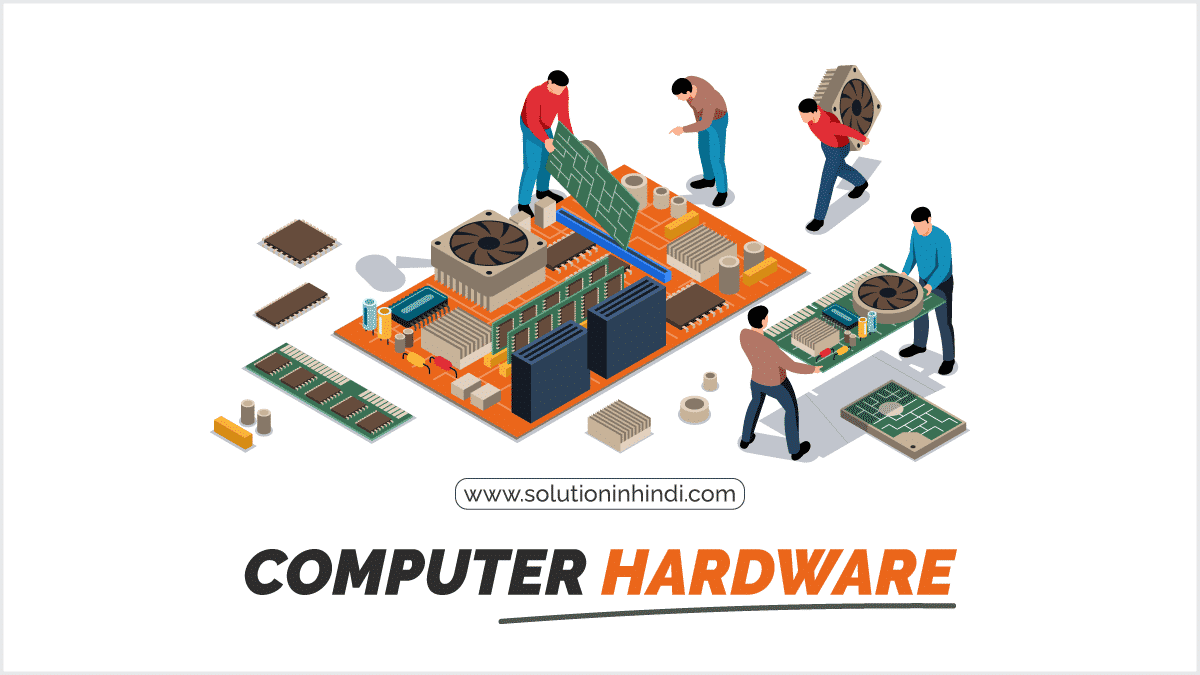
Computer hardware refers to the physical components of a computer that can be touched, seen, and manipulated. These components include devices such as the CPU, RAM, hard drive, keyboard, mouse, and monitor.
It includes everything with a circuit board, which operates under a laptop or PC; Such as, motherboard, CPU, ventilation fans, graphics card, webcam, power supply, hard disk, etc.
It's just part of the computer system, there's also firmware that's embedded in the hardware, and it controls. That is, firmware is used to interface with the hardware.
The difference in hardware for laptops and desktop PCs is designed only in size differences. But the same core components are given within PCs and laptops.
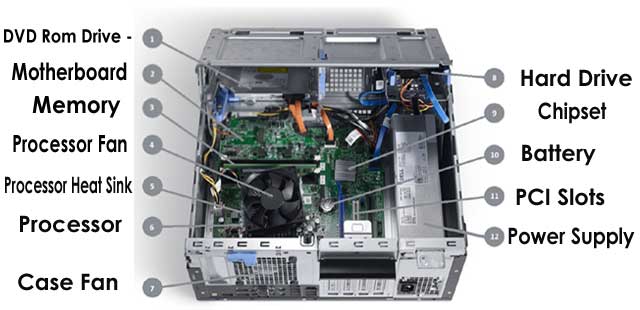
There is a difference in the design size of the cable hardware, but everything else is the same. Without hardware, there would be no way to run the essential software that makes the computer so useful.
Software is defined as virtual programs that run on your computer; That is, operating systems, web browsers, word-processing documents, and so on.
Let us now know the type of hardware in Hindi –
Types of Computer Hardware
There are different types of hardware, including:
1. Input device
Input devices are hardware components that allow users to input data into a computer system. Examples of input devices include keyboards, mice, scanners, and microphones.
- For more information, read our comprehensive article on what an input device is.
2. Output device
Output devices are hardware components that display or output data from a computer system. Examples of output devices include monitors, printers, and speakers.
For more information, read this article: What is an Output Device Full Information in Hindi.
3. Storage equipment
Storage devices are hardware components that are used to store data in a computer system. Examples of storage devices include hard drives, solid-state drives, and USB flash drives.
4. Processing equipment
Processing devices are the hardware components that are responsible for executing instructions and processing data in a computer system. CPU (Central Processing Unit) is an example of a processing device.
Let us now know about the components of Hardware in Hindi –
Hardware Components in Hindi
Computer hardware components are the physical parts of a computer system that can be seen, touched, and manipulated. These components work together to process the data and execute instructions.
Here are some of the main hardware components that are found in a typical computer system:
| Sl. No | constituent | work |
|---|---|---|
| 1 | motherboard | This main circuit board that connects and communicates with all other hardware components |
| 2 | CPU | Processes data and instructions and controls the operation of other hardware components |
| 3 | Random Access Memory | Temporary memory that stores the data being processed by the CPU |
| 4 | Hard Drive/Solid State Drive | Stores data and software permanently |
| 5 | Graphics Processing Unit (GPU) | It processes and renders images and videos |
| 6 | Power Supply Unit (PSU) | The PSU (Power Supply Unit) supplies power to all the hardware components |
| 7 | Input device (e.g. keyboard, mouse) | It allows the user to input data and commands into the computer system |
| 8 | Output devices (e.g. monitors, printers) | Displays or prints processed data |
How does hardware work in Hindi?
Hardware components work together to process data and execute instructions. The CPU is responsible for executing instructions, while RAM (Random Access Memory) is used to temporarily store the data being processed.
The hard drive is used to store data permanently and the motherboard is used to connect all the hardware components together.
Here's a step-by-step explanation of how hardware works in computer systems:
- Input: The user enters data and instructions through input devices such as the keyboard and mouse.
- Processing: The CPU (Central Processing Unit) reads the instructions and performs calculations and logical operations on the data.
- Storage: RAM (Random Access Memory) stores the data being processed temporarily, while hard drives or solid-state drives store data permanently.
- Output: The processed data is sent to an output device, such as a monitor, printer, or speaker, where it can be viewed, heard, or otherwise used.
- Communication: The motherboard and network interface allow hardware components to communicate with each other and with other computers on the network.
- Power: Hardware components require a power source to operate, which can come from a power supply unit connected to an electrical outlet.
Overall, the hardware components work together to process data and execute instructions, allowing users to interact with and use computer systems.
Let's understand the importance of Hardware in Hindi –
Importance of Hardware in Hindi
Hardware is essential for the functioning of a computer system. Without hardware, a computer system cannot process data or execute instructions.
Upgrading hardware can improve the performance of a computer system, making it faster and more efficient.
Relationship Between Hardware and Software
Here are some common relationships between hardware and software:
- Hardware and software are interdependent.
- Hardware and software work together to give useful output to the computer.
- The software cannot be used without hardware support.
- Hardware cannot be used without a set of programs, i.e. hardware without software is useless.
- Hardware is a one-time expense, and software has to be maintained continuously, so software development is very expensive.
- If hardware is the 'heart' of a computer system, then software is its 'soul'. That is, both complement each other.
How do hardware and software communicate?
A system resource is a tool that is used by hardware or software in conjunction with each other. When the software wants to send data to a Davis,
Such as when you want to save a file to a hard drive, or when the hardware needs attention, such as when you press a key on the keyboard.
TOH uses system resources for hardware or software communication. There are four types of system resources, which help hardware and software communicate with each other.
Such as – 1) Memory Address, 2) Input/Output Address, 3) Interrupt Request Number (IRQ), 4) Direct Memory Access (DMA) Channel.
For more information, watch this video tutorial (How Hardware and Software Communicate):
FREE Computer Course in Hindi
If you want to learn computers, then our free computer course is a good option for you. Start learning computers right now by clicking on the tutorial button below.
Learn about computer hardware in Hindi
- Hardware is a physical component that can be seen and touched.
- It comes with a circuit board, which operates under the PC.
- The example of hardware is CPU, motherboard, graphics card, power supply, and so on.
- Mainly, there are four (4) types of hardware. 1) System unit. 2) Input devices. 3) Output devices. 4) Memory storage devices.
- Hardware is the 'heart' of a computer system, and software is its 'soul'. That is, both are useless without each other.
- With the help of a system resource, hardware or software communicates with each other.
Hardware in Hindi FAQs:
Here are some of the important frequently asked questions of Hardware in Hindi with answers:
Computer hardware refers to the physical components of a computer system, such as the CPU, RAM, hard drive, motherboard, graphics card, power supply, and input/output devices such as keyboards, mice, and monitors.
The function of hardware is to provide the physical components that allow a computer system to process data, store information, communicate with devices, and operate by allowing user interaction.
Hardware are the physical parts of a computer, while software is the programs that run these hardware. Both are incomplete without each other.
Computer hardware is used for tasks such as data processing, input, output, and storage. Without hardware, a computer cannot work.
In this article, computer hardware is explained in easy Hindi. You can understand the definition of hardware, usage, and the difference from software by reading it.
Yes, at the end of this article you will find a PDF guide that you can download and read offline as well.
Computer Hardware in Hindi Notes PDF Download
If you want to understand computer hardware in easy language, then the Computer Hardware in Hindi Notes PDF prepared by us will be very beneficial for you. It explains the definition of hardware, usage, and differences from software with simple examples. You can read it offline anytime by easily downloading it from the link below.
conclusion
Hardware is the physical component of a computer that we can see and touch. It provides the necessary basis for the computer to function. Input, output, processing and storage — the role of hardware is important for every job.
Hope this article "Computer Hardware in Hindi – What is Hardware, Usage, Difference from Software" has been helpful to you in understanding hardware better.


Comments
Post a Comment